L&D benchmarking is more than tracking numbers; it’s about revealing the patterns in data that show how people, methods, and technology shape impact. For today’s learning leaders, it has become essential to replace assumptions with evidence when answering strategic questions from the boardroom about spend, capability, and performance. The L&D Benchmarking Survey Kit provides a structured way to do just that. It enables organizations to measure learning investments, engagement, capability growth, and business outcomes against credible industry benchmarks and peer sets. By using a clear scoring rubric to evaluate performance, teams can identify gaps, set realistic targets, and focus on the few metrics that truly drive business results. Designed for practical use, the kit turns benchmarking into a continuous cycle of measurement, prioritization, and improvement, helping L&D leaders look ahead with confidence and position learning as a strategic driver of growth.
What’s Inside the L&D Benchmarking Survey Kit Template?
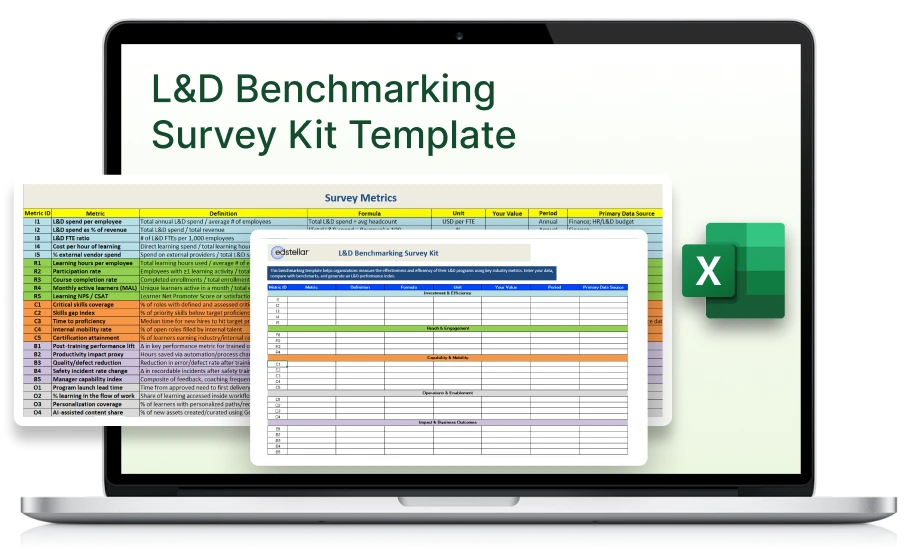
The L&D Benchmarking Survey Kit includes a survey sheet with key metrics and formulas, a scoring rubric defining performance levels and weights, and a scorecard view to track results. It helps organizations benchmark learning investments, measure outcomes, and prioritize improvement areas with clarity and consistency.
Key Components Included
1. Survey Sheet
A complete list of metrics with definitions, formulas, units, and input fields for your data. Each metric is organized under five categories Investment & Efficiency, Reach & Engagement, Capability & Mobility, Impact & Business Outcomes, and Operations & Enablement to give both executive visibility and team level actionability.
2. Scoring Rubric
A pre built table that defines Poor, Baseline, Competitive, and Leading performance levels for each metric. It also includes a Weight (0–10) column so you can prioritize metrics based on business relevance and calculate an overall composite score.
3.Scorecard Dashboard
A simple, color coded view to track category level performance, identify strengths and gaps, and monitor progress quarter over quarter.
4. Quick Reference Guide
Clear instructions on how to fill in the survey, assign weights, interpret scores, and run your next benchmarking cycle with confidence.
L&D Benchmarking Survey Kit Template Features
- Comprehensive Metric Framework: Covers five enterprise categories Investment, Reach, Capability, Impact, and Operations giving a complete view of L&D performance from efficiency to business outcomes.
- Weighted Scoring Rubric: Enables you to rate each metric from Poor to Leading and assign importance (0–10) for calculating composite and category level scores.
- Peer Set Comparison: Helps benchmark your results against both primary and aspirational peers, ensuring fair and goal oriented performance evaluation.
- Continuous Improvement Cycle: Designed for quarterly re-measurement and 90 days improvement sprints, turning benchmarking into a consistent habit, not a one off project.
Who Should Use the L&D Benchmarking Survey Kit Template?
How to Use the L&D Benchmarking Survey Kit Template
Review each metric’s Definition and Formula to understand the data required.
Select the metrics that match your organization’s requirements.
Fill the Your Value column. Use per employee or percentage values for consistency, and note the Primary Data Source (e.g., HRIS, LMS, Finance).
This is where you rate performance and calculate scores.
First, assign a Weight (0–10) to each metric based on importance. Then compare your values to the rubric to place them in Poor, Baseline, Competitive, or Leading.
View your overall and category scores to see where L&D performance stands.
Choose 3–5 metrics with the lowest scores or highest business impact; these are your priorities.
Update data every quarter to track progress and show measurable improvement over time.
Benefits of Using an L&D Benchmarking Survey Kit Template
For Organizations:
Data Driven Decision Making
Transforms learning data into actionable insights that guide strategic and budget decisions.
Performance Transparency
Provides a clear snapshot of how learning investments, engagement, and outcomes compare to industry peers.
Strategic Prioritization
Helps identify the top 3–5 focus areas that drive measurable business impact and workforce readiness.
Continuous Improvement Cycle
Enables quarterly re-benchmarking and progress tracking, turning learning performance into an ongoing discipline.
For L&D and HR Leaders:
Evidence for Executive Alignment
Equips leaders with credible, comparative data to justify budgets and demonstrate learning’s business value.
Clarity on Capability Gaps
Reveals where skills, engagement, or performance lag behind targets, guiding precise interventions.
Improved Cross Functional Collaboration
Brings Finance, HR, and Operations together under a unified data framework for cohesive reporting.
Enhanced Credibility and Influence
Positions L&D leaders as strategic partners who use data to shape business and talent outcomes.

.svg "edstellar")
.svg)
.svg)
.svg)

.svg)